Getting Started with AI: Cheat Sheet
① Start in one minute (it's free)
Open your web browser and go to any one of these, or use an app you already have. Circle the one you use, so you remember next time.
- ChatGPT · chatgpt.com
- Gemini · gemini.google.com
- Copilot · copilot.microsoft.com
- Claude · claude.ai
Type your question in the box at the bottom, and press send.
② Find your way around (this is ChatGPT; the others look much the same)
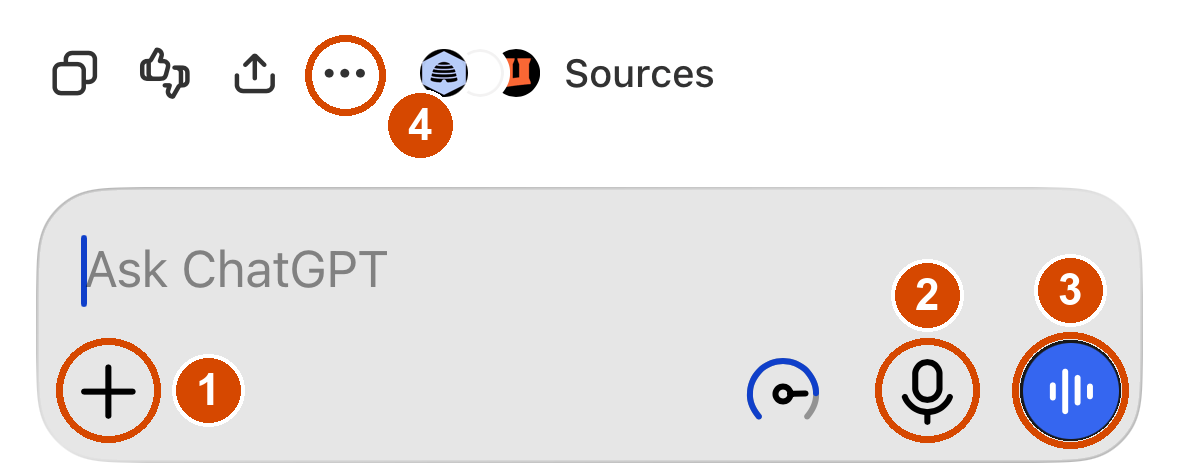
- + add a photo or screenshot
- Microphone: talk instead of typing
- Blue button: talk back and forth. (X to stop)
- Three dots: Read aloud. On Android, tap the speaker 🔊 under the answer.
③ When it's not what you meant
It misunderstood you? You did nothing wrong. Say so, and tell it what the thing is for and who it's for:
You asked: "Write something for my granddaughter's graduation."
You got: a long, formal speech.
You say: "No, that's not what I meant. I want a few lines for a card."
Once it knows you're writing a card, it already knows to keep it short and warm. You never had to ask for that. Going back and forth is how this is meant to work.
④ Ask for the shape you want
- "Give me step-by-step instructions."
- "Can you summarize this?"
- "Tell me more about…"
- "Make it a checklist."
- "Put it in a simple table."
- "Give me something I can print out."
- "Give me three options."
- "Shorter, simpler, or friendlier."
⑤ Spot a scam
Got a suspicious text, email, or call? Paste it in and ask: "Is this a scam? Should I be worried?" Warning signs: urgency, the unexpected, requests for money/gift cards/passwords, odd web addresses. More on scams, and what is going around right now, at simplehelpers.com/safe/.
⑥ Stay safe
- Never share passwords, your Social Security number, or full bank/card numbers.
- Double-check anything important (health, legal, money). It can be confidently wrong. Ask it: "How sure are you? What should I double-check?"
- It's not a person and it's not spying on you. A real AI will never ask you for money or passwords.
⑦ Questions later? Go to simplehelpers.com
Tap Getting Started with AI. It's free, with nothing to sign up for:
- Your questions, answered: Is it free? Is it safe? Is it listening to me?
- Over 60 sample questions for the kitchen, health, travel, family and more. Copy one and paste it in.
- 28 step-by-step workbooks, one small project each.
- Scams & spoofing: simplehelpers.com/safe/
Getting back in later
How I signed in, tick one: ☐ Continue with Google ☐ Continue with Apple ☐ Email & password
My email / username:
My password:
Someone I can ask:
Print it clearly. A capital I and a lowercase l look identical six months from now, and so do 0 and O. Then fold this sheet and keep it wherever you keep your important papers.